Thursday, May 28, 2026

Master SQL Careers in 2026: Choose the Right Path – SQL Analyst, SQL DBA, SQL Developer or SQL Engineer


Master SQL Careers in 2026: Choose the Right Path – SQL Analyst, SQL DBA, SQL Developer or SQL Engineer

Explore SQL Analyst, SQL DBA, SQL Developer, and SQL Engineer career paths. Learn benefits, features, job opportunities, and future scope of SQL training with practical projects and industry-focused learning.

Data is the New Fuel. SQL is the Engine

Every application, website, mobile app, AI system, banking platform, healthcare solution, and e-commerce business runs on data. Behind that data lies one of the most valuable skills in the technology industry: SQL (Structured Query Language).

SQL is not just a technology—it is the foundation of modern data careers.

Whether you want to analyze business data, manage databases, develop applications, or build large-scale data platforms, SQL is the first skill that opens the door.

Today, organizations are actively hiring professionals with SQL expertise for roles such as:

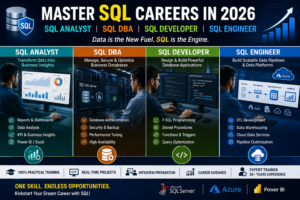
✔ SQL Analyst
✔ SQL DBA
✔ SQL Developer
✔ SQL Engineer
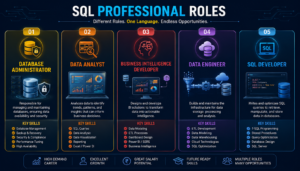
✔ Data Analyst
✔ Data Engineer
✔ BI Developer


What Makes SQL One of the Most Valuable Skills?

SQL is the language used to communicate with databases.

It helps organizations:

  • Store business data
  • Retrieve information quickly
  • Generate reports
  • Analyze customer behavior
  • Support AI and Machine Learning systems
  • Manage enterprise applications

Almost every company that uses software relies on databases, and almost every database professional relies on SQL.

That is why SQL has remained relevant for decades and continues to be one of the most requested skills in job descriptions worldwide.

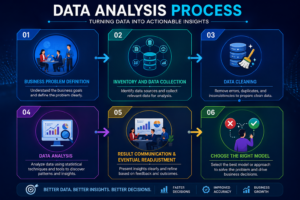
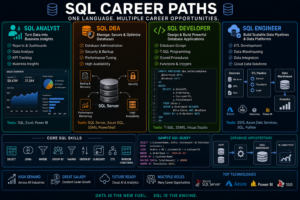
SQL Analyst – Transform Data into Business Insights

A SQL Analyst helps organizations understand their data and make smarter decisions.

Instead of managing servers or building applications, SQL Analysts focus on extracting valuable information from databases.

What Does a SQL Analyst Do?

  • Create reports
  • Analyze business trends
  • Validate data quality
  • Build dashboards
  • Support management decisions
  • Generate KPI reports

Skills You Learn

  • SQL Queries
  • Joins
  • Views
  • Reporting Techniques
  • Data Analysis
  • Power BI
  • Excel Analytics
  • Dashboard Development


Why Choose SQL Analyst?

✔ Ideal for freshers

✔ Strong demand across industries

✔ Gateway to Data Analytics

✔ Less coding compared to development roles

✔ Excellent career growth opportunities

Popular Job Roles

  • SQL Analyst
  • Data Analyst
  • Reporting Analyst
  • BI Analyst
  • MIS Executive

SQL DBA – Become the Guardian of Business Databases

Imagine a company losing its customer database.

The impact could be catastrophic.

This is where SQL DBAs become invaluable.

A SQL DBA (Database Administrator) ensures databases remain secure, available, optimized, and protected.

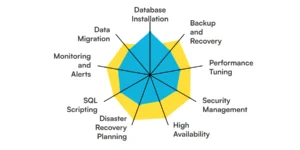
Responsibilities of a SQL DBA

  • Database Installation
  • Backup and Recovery
  • Performance Monitoring
  • Security Management
  • High Availability Setup
  • Disaster Recovery Planning
  • Production Support


Skills You Learn

  • SQL Server Administration
  • User Management
  • Security Concepts
  • Backup & Restore
  • Performance Tuning
  • Index Management
  • Azure SQL Administration

Advantages of SQL DBA Career

✔ High-paying specialized role

✔ Strong demand in enterprise environments

✔ Opportunities in Cloud Database Administration

✔ Excellent career stability

Career Opportunities

  • SQL DBA
  • Azure SQL DBA
  • Database Administrator
  • Production Support DBA
  • Cloud Database Engineer

SQL Developer – Build Powerful Database Applications

SQL Developer are responsible for creating the database layer that powers software applications.

Whenever an application stores or retrieves data, SQL Developers play a critical role behind the scenes.

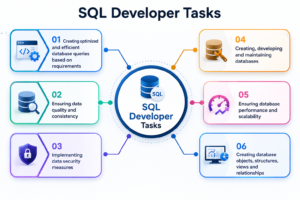
What Does a SQL Developer Do?

  • Design databases
  • Create stored procedures
  • Develop functions and triggers
  • Optimize queries
  • Support application development
  • Improve database performance

Skills You Learn

  • T-SQL Programming
  • Database Design
  • Data Modeling
  • Stored Procedures
  • Functions
  • Triggers
  • Query Optimization


Benefits of Becoming a SQL Developer

✔ Great for software professionals

✔ Strong demand across IT companies

✔ Excellent programming exposure

✔ Smooth transition into Full Stack Development

Popular Job Roles

  • SQL Developer
  • Database Developer
  • Backend Developer
  • ETL Developer
  • Application Database Specialist

SQL Engineer – Build the Future of Data Platforms

As businesses generate massive amounts of data, SQL Engineers are becoming one of the most sought-after professionals in the industry.

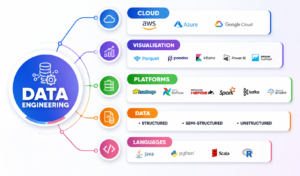
SQL Engineers work on data pipelines, ETL processes, data warehouses, and cloud platforms.

Key Responsibilities

  • ETL Development
  • Data Warehouse Design
  • Data Integration
  • Cloud Data Processing
  • Pipeline Development
  • Performance Optimization

Skills You Learn

  • Advanced SQL
  • ETL Concepts
  • Data Warehousing
  • Azure Data Services
  • Cloud Fundamentals
  • Data Engineering Concepts


Why SQL Engineering?

✔ One of the fastest-growing careers

✔ Strong global demand

✔ High salary potential

✔ Pathway to Data Engineering and AI

Popular Job Roles

  • SQL Engineer
  • Data Engineer
  • ETL Developer
  • Analytics Engineer
  • Cloud Data Engineer

Which SQL Course Should You Choose?


Why Professional SQL Training Matters

Learning SQL from random videos can help you understand concepts.

Learning SQL through structured training helps you build a career.

A professional SQL course should include:

Practical Learning

Real-world examples instead of theory-only sessions.

Step-by-Step Curriculum

Easy-to-understand approach for beginners and experienced professionals.

Real-Time Projects

Hands-on experience with business scenarios.

Interview Preparation

Technical questions, practical assignments, and mock interviews.

Industry-Oriented Training

Content aligned with current market requirements.

Career Guidance

Roadmaps, job role understanding, and technology selection.
 

Who Should Learn SQL?

SQL training is highly recommended for:

  • Fresh Graduates
  • Job Seekers
  • Software Engineers
  • Support Professionals
  • Business Analysts
  • Data Analysts
  • ETL Developers
  • Database Administrators
  • Professionals Planning Career Switches

Why Learn SQL with SQL School?

At SQL School, we focus on 100% Practical Training designed for real-world careers.

What You Get

✅ Step-by-Step Learning Approach

✅ Real-Time Projects

✅ Industry-Oriented Curriculum

✅ Interview Preparation

✅ Career Guidance

✅ Experienced Trainer with 20+ Years of Industry Experience

✅ Flexible Learning Options

Whether your goal is to become a SQL Analyst, SQL DBA, SQL Developer, or SQL Engineer, the right training can significantly accelerate your career growth.

Frequently Asked Questions (FAQs)

Is SQL suitable for freshers?

Yes. SQL is one of the best technologies for freshers entering the IT industry.

Which SQL career path has the highest demand?

Currently SQL Analysts, SQL Developers, SQL DBAs, and SQL Engineers are all highly sought after depending on industry needs.

Do I need programming knowledge to learn SQL?

No. Beginners can start learning SQL without prior programming experience.

How long does it take to learn SQL?

Basic SQL can be learned within a few weeks. Advanced skills require practical project experience.

Is SQL useful for AI and Data Science?

Absolutely. SQL is one of the most important skills used in data preparation and analytics workflows.

Conclusion

SQL is the foundation of modern data, analytics, and database careers, offering opportunities as a SQL Analyst, SQL DBA, SQL Developer, or SQL Engineer. With strong industry demand and excellent career growth, SQL remains one of the most valuable skills in IT. Practical training and real-time projects help learners become job-ready faster. Start learning SQL today and build a successful future in the data-driven world. πŸš€

SQL Data Analyst Course Curriculum: https://sqlschool.com/analyst-courses/

SQL Data Engineer Course Curriculum: https://sqlschool.com/data-engineer-courses/

SQL Developer Course Curriculum: https://sqlschool.com/sql-server-training/

SQL DBA Course Curriculum: https://sqlschool.com/dba-courses/

 Register for Demo->

#SQL #SQLTraining #LearnSQL #SQLCourses #SQLDeveloper #SQLDBA #SQLAnalyst #SQLEngineer #DatabaseAdministrator #DatabaseDeveloper #DataAnalyst #DataEngineering #DataEngineer #ETLDeveloper #DataWarehouse #BusinessIntelligence #PowerBI #MicrosoftSQLServer #TSQL #DatabaseManagement #CareerInData #DataCareers #ITCareers #TechSkills #Upskilling #CareerGrowth #JobReadySkills #DatabaseTraining #SQLSchool #DataAnalytics


Trainer: Mr. Sai Phanindra
With 20+ Years of
technical expertise exclusively on SQL & Database Technologies, I assure you 100% Practical, Step by Step Classes.
Linkdin Profile: www.linkedin.com/in/saiphanindra/
Contact No: +91 9030040801 or +91 9666640801

 

Thursday, October 30, 2025

Step-by-Step Installation of Microsoft SQL Server


Step-by-Step Installation of Microsoft SQL Server

Introduction

        Microsoft SQL Server is a relational database management system (RDBMS) developed by Microsoft. It is used to store, organize, and manage data efficiently using Structured Query Language (SQL). SQL Server allows users to create databases, run queries, analyse data, and securely manage information for applications, websites, and enterprises.


What is Database?

A platform to store any type of data and any amount of data.

ΓΌ  Full Secured

ΓΌ  Easy to Organize

ΓΌ  Stores Unlimited Data

ΓΌ  Supports Cloud

Types of Databases?

TWO Basic Types of Databases:

  1. OLTP Databases
  2. DWH Databases

OLTP: Online Transaction Processing Databases. These databases are used to store LIVE, Real-time Data.

Example: LIVE Temperature Data, LIVE Stock Market Operations. 

DWH: Data Warehouse Databases. These databases are used to store historical data.

Implemented by using ETL (Extract, Transform, Load) Technologies.

Ex: Weather Forecast, Stock Analysis, etc...


What is SQL?

SQL means Structured Query Language, a communication platform to operate on any database.

What is MSSQL?

A variant of SQL.  also called TSQL [transact SQL / MSSQL] used to store, manage Microsoft SQL databases.


⚙️ Key Features:

  • Stores data in tables (rows and columns).
  • Supports SQL for querying and managing data.
  • Provides security, data integrity, and backup features.
  • Works with applications, websites, and BI tools (like Power BI).
  • Includes tools like SQL Server Management Studio (SSMS) for easy management.


What is SQL Server?

A DBMS software from MICROSOFT.  very user-friendly user interface, cheaper, free support, supports cloud.

Versions of SQL Server?              

SQL Server 2022*, SQL Server 2019, SQL Server 2017*, SQL Server 2016 ...... 

Editions of SQL Server?                                      

Developer, Evaluation, Enterprise, Data Centre, Standard Editions.

OS REQUIREMENTS [ANY ONE]

VERSION NAME

VERSION NUMBER

INSTALLATION REQUIREMENTS

SQL Server 2022 (latest version)

16.0


WINDOWS 8 OR HIGHER. 64-bit

SQL Server 2019 *          

15.0

SQL Server 2017              

14.0

HARDWARE REQUIREMENTS

6 GB RAM

10 GB DISK SPACE

Any Processor that supports Windows OS

 SQL Server installation steps

STEP 1: Install SQL Server 2022

STEP 2: Install SQL Server 2019                    

STEP 3: Install SSMS (SQL Server Management Studio) Tool

             Purpose: To Develop/ Manage the Databases.

STEP 4: Connect to your Local Server (Free Trail)

 Connect to our Online Server (Licensed Server)


Detailed Installation Steps:

Step 5: Download SQL Server 2022 FROM  https://sqlschool.com/downloads/

 Right Click the downloaded file > Extract.

Then you get one Folder.

Open the folder > Double Click Setup Application File [Green Icon]:


Step 6: Go to left> Installation > Right: New installation

        We get “Installation center” Screen > Go to installation page > New installation


        Step 7: Click Next > SELECT EVALUATION / DEVELOPER EDITION > Accept Licensing Terms > Next:    Uncheck Azure Extension box

Step 8: Click Next > Select Database Engine Component (For OLTP: LIVE, Real-time Data) > Next


Step 9: Specify a Name to your Installation = INSTANCE NAME > Click Next


Step 10: Click Next > Next > Add Current User as Administrator:

Step 11: Install

Step 1: Install SQL Server 2022

For Server 1

Step 2: Install SQL Server 2019

For Server 2


DOWNLOAD 2022

https://sqlschool.com/downloads/

EXTRACT

DOUBLE CLICK SETUP FILE


  INSTALLATION: NEW INSTALLATION

  EDITION: EVALUATION (6 MONTHS FREE)

  UNCHECK AZURE (MICROSOFT CLOUD)

  CHECK @ DATABASE ENGINE (FOR OLTP)

  SPECIFY INSTALLATION NAME

  ADD CURRENT USER AS ADMIN

  INSTALL.


DOWNLOAD 2019

https://sqlschool.com/downloads/

EXTRACT

DOUBLE CLICK SETUP FILE


  INSTALLATION: NEW INSTALLATION

  EDITION: DEVELOPER (LIFE LONG FREE)

  CHECK @ DATABASE ENGINE (FOR OLTP)

  SPECIFY INSTALLATION NAME

  ADD CURRENT USER AS ADMIN

  AUTHENTICATION: MIXED MODE 

  SET sa PASSWORD [Ex: admin123$]

  INSTALL

 Step 12: How to install SSMS Tool?

SSMS: SQL Server management studio

Purpose: This free tool is used to connect to above installed SQL Servers.

                Perform data storage, retrieval, management, etc.… using SQL.

Download SSMS Tool from  https://aka.ms/ssmsfullsetup

Double Click the SSMS-Setup-ENU File > Install.  It would take about 20 to 45 mins.

Restart your computer.

After restarting your computer: If you get REPAIR screen then CLOSE it.

Do not click repair. Just close the window.

Step 13: How to test the installations?  How to test the server connections?

Windows app> Search > Type "SSMS" > Click > Prompt for Server name>

In Server name dropdown: Browser for more> Expand Database engine > Select above installed server (1) > OK > Connect.

From SSMS > Top left: Connect > Prompt for Server name > Browse for more > Expand Database engine > Select above installed server (2) > OK > Connect.

Step 14: How to connect to our online server for case studies, project work? 

From SSMS > Top left: connect > Database engine >

Specify the server’s name

Authentication: SQL Server

Login name: XXXXX

Password:  YYYYYY

Trust Server Certificate > Connect

Authentication:

Authentication is a communication path between End Users / Apps and SQL Server.

Authentication Modes:

1.     Windows Authentication Mode: Only Windows Logins are supported

2.     Mixed Mode Authentication: Windows Logins + SQL Logins are supported.

In case of SQL Logins, one default admin account “sa” (System Administrator) is automatically enabled. We need to set a password for this Built-In login. We did the same for 2nd server installation.

Conclusion

      The installation of Microsoft SQL Server is a straightforward process when the steps are followed carefully. By completing the setup and configuration successfully, users can efficiently create, manage, and maintain databases for various applications. Once installed, SQL Server provides a secure, high-performance, and user-friendly environment for handling data across different business and development needs.

INSTALLATION VIDEO: CLICK HERE TO WATCH


Friday, August 29, 2025

Master Azure Data Engineering

Master Azure Data Engineering with SQL School

In today’s digital economy, organizations rely on cloud-based data platforms to process, manage, and analyze vast amounts of information. Among these, Microsoft Azure has emerged as a global leader, powering businesses with robust data engineering solutions. If you are looking to build a future-proof career in data, the Azure Data Engineer Course at SQL School is the right choice for you.

Why Azure Data Engineering?

  • Cloud Adoption is Booming: Businesses worldwide are migrating to Azure for data storage and advanced analytics.

  • High Demand, High Pay: Azure Data Engineers are some of the most sought-after professionals, earning top salaries in India and abroad.

  • Key to Modern Data Workflows: From ETL pipelines to real-time analytics, data engineering is the backbone of digital transformation.

According to Microsoft Azure’s official report cloud-based data engineering roles will continue to be among the fastest growing in the coming decade.


SQL School’s Azure Data Engineer Training

At SQL School Training Institute, Hyderabad, we combine 19+ years of training expertise with real-world project experience to deliver an industry-leading course in Azure Data Engineering.

πŸ”‘ Key Modules You’ll Learn:

  1. Azure Data Factory (ADF) – Build, orchestrate, and monitor data pipelines.

  2. Azure Synapse Analytics – Data warehousing and advanced analytics.

  3. Azure Databricks – Spark, PySpark, and AI-powered data processing.

  4. Data Lake & Lakehouse – Enterprise-scale data storage and modeling.

  5. Power BI Integration – End-to-end analytics with dashboards and reports.

πŸ‘‰ Explore Azure Data Engineer Course Details

Why Choose SQL School?

  • Microsoft Certified Mentor: Learn from Sai Phanindra Sir with 19+ years of IT expertise.

  • Hands-On Learning: Every session includes live projects and practical labs.

  • Flexible Modes: Join Live Interactive Classes or learn via self-paced video modules.

  • Interview-Ready: SQL School provides daily interview Q&As and 54-week interview prep support.

  • Job Assistance: Resume building, mock interviews, and referrals through alumni networks.

πŸ‘‰ Check Microsoft Fabric Data Engineer Course
πŸ‘‰ See SQL DBA Training Program

Career Outcomes

After completing this course, you can confidently apply for roles such as:

  • Azure Data Engineer

  • Cloud Data Engineer

  • Big Data Engineer

  • Data Pipeline Developer

  • BI + Cloud Integration Specialist

According to Glassdoor the average salary for an Azure Data Engineer in India ranges from ₹8–18 LPA, depending on skills and experience.

πŸ‘‰ Explore Power BI with AI Training
πŸ‘‰ Discover Business Analyst Training Program

Why Now is the Right Time

The digital transformation wave is accelerating. With AI, cloud, and big data converging, Azure Data Engineers are in a prime position to lead the future of enterprise data solutions. SQL School ensures you are job-ready with real-time projects from Day One.

πŸ‘‰ Register for a Free Demo Session